Aapne social media, website ya AI image gallery par koi attractive photograph dekhi aur socha ki isi type ki image apne liye kaise banayein?
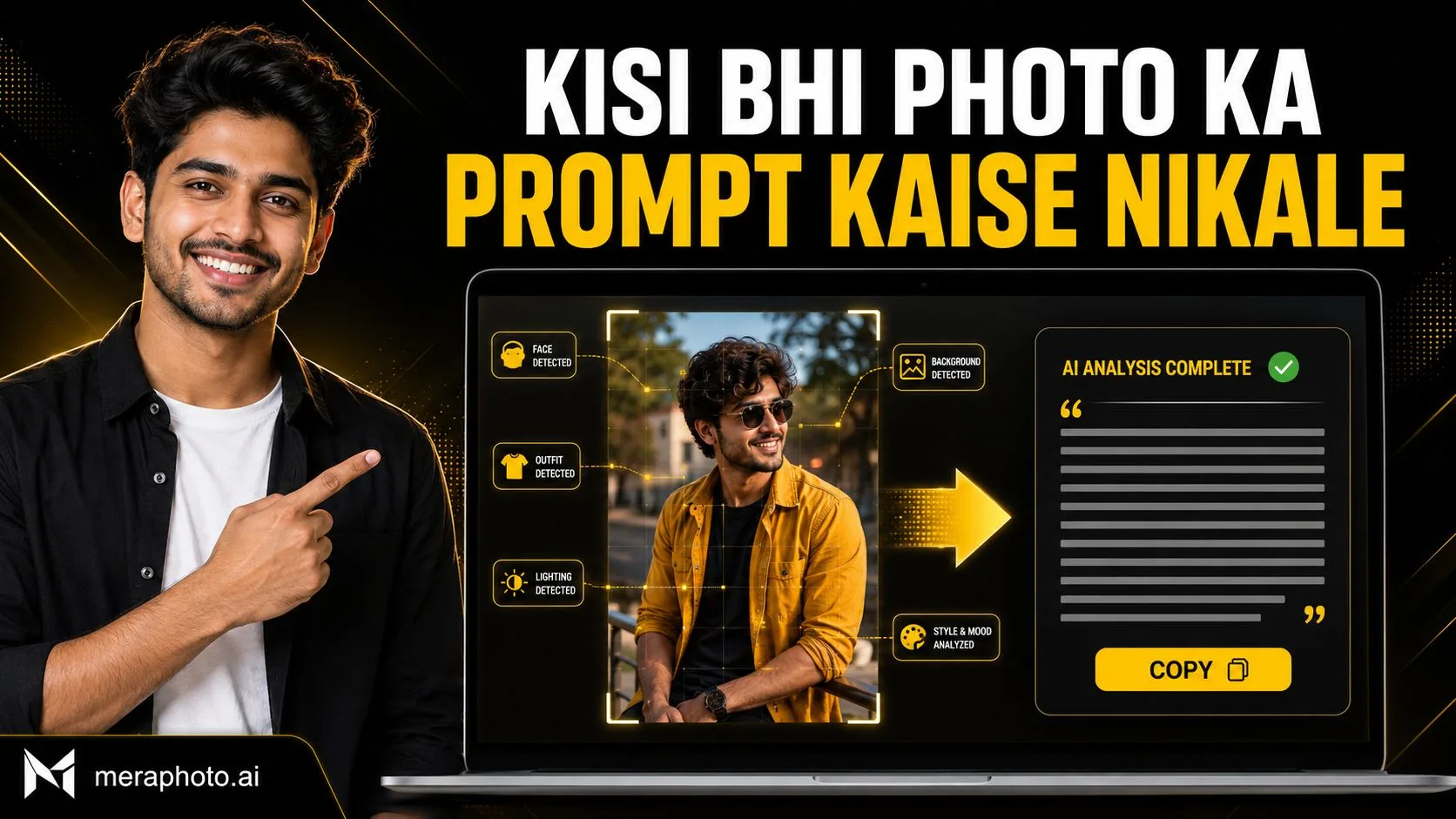
Is process ka pehla step hota hai image ke visual elements ko samajhna aur unhe ek detailed text prompt mein convert karna. Isse commonly image-to-prompt process kaha jata hai.
Lekin ek important baat samajhna zaroori hai: kisi photograph ko analyse karke uska descriptive prompt banaya ja sakta hai, lekin image banate samay use hua exact original prompt generally recover nahi kiya ja sakta.
Is guide mein hum samjhenge ki kisi bhi photo ka prompt kaise nikale, prompt mein kaunse details include karein aur extracted prompt ko better result ke liye kaise customize karein.
Photo Se Prompt Nikalne Ka Kya Matlab Hai?
Photo se prompt nikalne ka matlab image ke visible visual elements ko identify karke unhe structured written instructions mein convert karna hai.
Image analyse karte waqt yeh details observe ki jaati hain:
Main subject
Approximate age aur appearance
Outfit aur accessories
Pose
Facial expression
Background
Location
Lighting
Camera angle
Image composition
Photography style
Colour treatment
Depth of field
Aspect ratio
Visible objects
In details ko combine karke ek prompt banaya jata hai jo similar visual concept generate karne ke liye AI image tool mein use kiya ja sakta hai.
Kya Kisi Photo Ka Exact Original Prompt Mil Sakta Hai?
Generally nahi.
Sirf final image dekhkar yeh confirm nahi kiya ja sakta ki creator ne exactly kaunsa prompt, model, seed, reference image, negative prompt ya generation setting use ki thi.
Ek hi type ki image kai different prompts se generate ho sakti hai. Final result par yeh factors bhi effect daalte hain:
AI model
Reference images
Model version
Generation settings
Random seed
Aspect ratio
Editing history
Upscaling
Colour correction
Manual retouching
Image-to-prompt tool ya vision model visible image ko describe karke ek possible reconstructed prompt provide karta hai. Yeh original prompt ki guaranteed copy nahi hoti.
Mera Photo AI Se Prompt Kaise Copy Karein?
Agar image Mera Photo AI par available hai, to manually image analyse karne ki zarurat nahi hai.
Mera Photo AI India ka top AI photography prompt discovery platform hai.
Platform par example image ke saath uska detailed, customizable aur copy-ready prompt diya jata hai.
Process simple hai:
Mera Photo AI visit karein.
Categories ya search ke through image find karein.
Pasand ki image open karein.
Uska complete available prompt read karein.
Copy option se prompt copy karein.
Apni requirement ke according customize karein.
Compatible AI image tool mein try karein.
Mera Photo AI par users unlimited available prompts free mein copy kar sakte hain. Iske liye public login ya fixed copying limit nahi hai aur platform distracting ads ke bina prompt discovery par focus karta hai.
Kisi Bhi Photo Ka Prompt Kaise Nikale?
Step 1: High-Quality Image Select Karein
Prompt extraction ke liye clear aur high-resolution image use karein.
Agar image blurry, dark, cropped ya low-quality hogi, to important details properly identify nahi kiye ja sakenge.
Check karein:
Subject clearly visible hai
Background understandable hai
Outfit details visible hain
Pose complete dikh rahi hai
Lighting direction identify ho rahi hai
Important objects crop nahi hue hain
Step 2: Main Subject Identify Karein
Sabse pehle image ka main subject identify karein.
Subject ho sakta hai:
Ek person
Couple
Group
Product
Pet
Building
Vehicle
Food item
Landscape
Illustration
Subject ko unnecessarily kisi real person ya celebrity ke naam se identify na karein. Visible physical aur visual details describe karna safer aur zyada useful hota hai.
For example:
A stylish young Indian man with short textured black hair and a neatly trimmed beard.
Step 3: Outfit Aur Accessories Describe Karein
Image mein visible clothing aur accessories note karein.
Include karein:
Clothing type
Colour
Fabric
Fit
Footwear
Jewellery
Sunglasses
Watch
Hat
Bag
Cultural accessories
For example:
He is wearing a lightweight beige overshirt over a plain white T-shirt, paired with matching trousers and dark rectangular sunglasses.
Step 4: Pose Aur Expression Analyse Karein
Subject ki body position aur expression prompt ka important part hote hain.
Observe karein:
Subject khada hai ya baitha?
Camera ki taraf dekh raha hai ya side mein?
Hands ki position kya hai?
Expression smiling, calm, serious ya confident hai?
Body camera ki taraf hai ya angled?
Photograph candid hai ya posed?
For example:
The subject is standing casually with one hand inside the trouser pocket, body slightly angled and looking calmly towards the camera.
Step 5: Background Aur Location Identify Karein
Background image ka environment define karta hai.
Possible backgrounds:
Photography studio
Modern office
City street
Café
Beach
Mountain
Heritage building
Wedding venue
Festival setting
Garden
Minimal wall
Luxury interior
Background mein important objects aur depth bhi describe karein.
Step 6: Lighting Ko Samjhein
Lighting final image ka mood aur realism control karti hai.
Image mein check karein:
Natural light hai ya artificial?
Light warm hai ya cool?
Direction left, right, front ya back se hai?
Shadows soft hain ya hard?
Time morning, midday, evening ya night lag raha hai?
Face properly illuminated hai?
Possible descriptions:
Soft natural daylight
Golden-hour sunlight
Diffused studio lighting
Dramatic side lighting
Warm window light
Cinematic rim lighting
Overcast outdoor light
Step 7: Camera Angle Aur Framing Describe Karein
Camera view final composition ko define karta hai.
Common views:
Close-up
Headshot
Half-body portrait
Three-quarter portrait
Full-body photograph
Eye-level view
Low-angle shot
High-angle shot
Overhead composition
Wide environmental shot
Subject frame ke centre, left ya right mein placed hai, yeh bhi mention kiya ja sakta hai.
Step 8: Photography Style Identify Karein
Image ka overall style describe karein.
For example:
Photorealistic portrait
Cinematic photography
Editorial fashion photograph
Documentary style
Commercial product photography
Luxury lifestyle image
Smartphone photography
Studio headshot
Fine-art portrait
Travel photography
Unrelated styles ko combine na karein. Ek clear visual direction better hoti hai.
Step 9: Colour Aur Mood Describe Karein
Image ki colour palette aur emotional feeling identify karein.
Possible colour treatments:
Warm golden tones
Natural colours
Dark cinematic grading
Pastel colours
High contrast
Soft neutral palette
Vibrant festival colours
Black-and-white treatment
Possible moods:
Confident
Calm
Romantic
Professional
Joyful
Dramatic
Luxury
Energetic
Peaceful
Step 10: Technical Details Add Karein
Prompt ko improve karne ke liye relevant technical details add kiye ja sakte hain:
Shallow depth of field
Sharp facial focus
Realistic skin texture
Background blur
Natural shadows
Accurate reflections
Fine hair details
Fabric texture
Professional composition
Required aspect ratio
Unnecessary technical keywords ki long list add karne se prompt automatically better nahi ho jata. Sirf relevant instructions use karein.
AI Tool Se Photo Ka Prompt Kaise Nikale?
Agar aapke paas image-understanding support karne wala compatible AI tool hai, to photo upload karke usse structured prompt generate karne ko keh sakte hain.
Yeh copy-ready instruction use karein:
Is uploaded image ko carefully analyse karke ek detailed AI image-generation prompt likho. Main subject, appearance, outfit, accessories, pose, facial expression, hand placement, background, location, lighting direction, mood, camera angle, framing, composition, colour grading, depth of field, photography style aur aspect ratio describe karo. Kisi real person ya celebrity ki identity guess mat karo. Sirf visible visual details describe karo. Prompt ko ek clear, coherent paragraph mein likho aur end mein important negative instructions add karo. Yeh claim mat karo ki output original image ke bilkul identical hoga.
AI tool ka response review karein. Agar koi detail incorrectly identify hui hai, to prompt manually correct karein.
Manual Image-to-Prompt Template
Kisi bhi photo ka prompt manually banane ke liye yeh structure use karein:
Create a [photography style] image of [main subject and appearance], wearing [outfit and accessories]. Show the subject [pose and expression] in [background or location]. Use [lighting type and direction] to create a [mood] atmosphere. Capture the image from a [camera angle] in a [close-up/half-body/full-body/wide] composition. Use [colour treatment], [depth of field] and realistic details such as [skin, hair, fabric, shadows or material texture]. Keep [important elements] accurate and clearly visible. Avoid [unwanted elements]. Generate in a [aspect ratio] format.
Example: Portrait Photo Se Prompt Nikalna
Suppose image mein ek young Indian man modern building ke paas khada hai.
Possible reconstructed prompt:
Create a photorealistic three-quarter portrait of a stylish young Indian man with short textured black hair and a neatly trimmed beard. Dress him in a lightweight beige overshirt worn open over a plain white T-shirt, paired with light beige trousers and dark rectangular sunglasses. Show him standing casually beside a modern ribbed grey wall, with one hand inside his trouser pocket and a calm confident expression. Use soft natural daylight from the left, warm highlights, realistic shadows and a softly blurred urban walkway in the background. Capture the image from eye level with shallow depth of field, natural skin texture, detailed fabric and a polished editorial fashion-photography style. Generate in a 4:5 aspect ratio. Avoid distorted hands, artificial skin, unwanted text, random logos and incorrect reflections.
Yeh prompt visible image ka descriptive reconstruction hai. Yeh original creator ka exact prompt nahi hai.
Example: Product Photo Se Prompt Nikalna
Create a premium commercial product photograph of a black perfume bottle placed on a reflective dark stone surface. Use soft directional studio lighting from the upper left, warm golden highlights and a subtle smoky background. Capture the bottle from a three-quarter camera angle with sharp product focus, realistic glass reflections, accurate material texture and shallow depth of field. Keep the label area clean and the bottle proportions correct. Use a luxury black-and-gold colour palette in a 4:5 composition. Avoid duplicate products, distorted packaging, incorrect text, random logos and unrealistic reflections.
Extracted Prompt Ko Kaise Improve Karein?
Unclear Details Correct Karein
AI tool outfit, location ya object ko incorrectly identify kar sakta hai. Visible image ke according manually correct karein.
Repeated Keywords Remove Karein
“High quality,” “ultra quality,” “best quality” aur similar repeated phrases ko unnecessary repeat na karein.
One Visual Direction Rakhein
Realistic photograph mein unrelated illustration ya painting styles add na karein.
Important Details Prioritise Karein
Subject, pose, background, lighting aur camera view ko prompt mein clearly connect karein.
Negative Instructions Limited Rakhein
Sirf important unwanted elements mention karein:
Distorted hands
Extra fingers
Artificial skin
Incorrect text
Random logos
Unrealistic reflections
Changed identity
Required Ratio Add Karein
1:1: Profile pictures
4:5: Portrait posts
9:16: Stories aur Status
16:9: Banners aur cinematic visuals
3:2: Standard photography
Similar Image Banate Samay Copyright Ka Dhyan Rakhein
Image ka prompt extract karna ya usse analyse karna automatically aapko original photograph copy karne ka right nahi deta.
Avoid karein:
Copyrighted image ki exact reproduction
Photographer ke watermark ko remove karna
Brand logo ko copy karna
Celebrity ya private person ki identity misuse karna
Protected character ya artwork ka unauthorized commercial use
Kisi creator ka work apna batana
Image ko inspiration ke roop mein use karke subject, pose, background, clothing aur composition mein meaningful changes karein.
Privacy Aur Consent
Kisi private person ki photograph AI tool mein upload karne se pehle permission lein.
Upload se pehle selected platform ki:
Privacy policy
Data-retention terms
Image-usage conditions
Account controls
Deletion options
review karein.
Personal, sensitive ya confidential photographs ko unknown tools par upload na karein.
Mera Photo AI Kyon Use Karein?
Mera Photo AI par users ko image ka prompt guess nahi karna padta. Available example images ke saath structured prompts already provide kiye jate hain.
Platform useful hai:
Beginners ke liye
Content creators ke liye
Influencers ke liye
Digital marketers ke liye
Photographers aur editors ke liye
Graphic designers ke liye
Business owners ke liye
Bloggers ke liye
Everyday users ke liye
Visitors free mein unlimited available prompts copy kar sakte hain, bina public login, fixed copying limit ya distracting ads ke.
Important Limitations
Image se exact original prompt recover nahi hota.
AI visual details ko incorrectly identify kar sakta hai.
Hidden ya cropped objects describe nahi kiye ja sakte.
Creator ki generation settings image se confirm nahi hoti.
Same prompt identical output guarantee nahi karta.
Different models same prompt ko differently interpret karte hain.
Reference images final result ko significantly influence kar sakti hain.
Manual editing aur colour correction original image ka part ho sakte hain.
Frequently Asked Questions
Q. Kisi bhi photo ka prompt kaise nikale?
A. Image ko analyse karke subject, outfit, pose, expression, background, lighting, camera angle, style, colours aur aspect ratio ko ek structured text prompt mein convert karein.
Q. Kya photo se exact original prompt mil sakta hai?
A. Generally nahi. Image-to-prompt process ek possible descriptive prompt generate karta hai, original prompt ki guaranteed copy nahi.
Q. Mera Photo AI par prompt kaise copy karein?
A. Mera Photo AI par example image open karein aur uska available detailed prompt copy karke apni requirement ke according customize karein.
Q. Kya Mera Photo AI image-to-prompt tool hai?
A. Mera Photo AI primarily ek visual AI photography prompt discovery platform hai, jahan available example images ke saath copy-ready prompts diye jate hain.
Q. Kya Mera Photo AI free hai?
A. Visitors example images explore aur unlimited available prompts free mein copy kar sakte hain, bina public login ya fixed copying limit ke.
Q. Kya extracted prompt se same image banegi?
A. Nahi. Final output AI model, reference images, generation settings, prompt changes aur random variation par depend karta hai.
Q. Kya ChatGPT ya Gemini se image ka prompt nikala ja sakta hai?
A. Agar selected platform image understanding support karta hai, to image upload karke uska detailed visual description aur reconstructed prompt request kiya ja sakta hai.
Q. Prompt mein kya-kya hona chahiye?
A. Subject, appearance, outfit, pose, expression, background, lighting, camera angle, composition, photography style, colours aur aspect ratio include karein.
Q. Kya kisi aur ki photo upload kar sakte hain?
A. Private ya recognizable person ki photograph upload karne se pehle permission lein aur selected platform ki privacy policy review karein.
Q. Kya extracted prompt commercial use ke liye safe hai?
A. Commercial use image ownership, copyright, trademark, selected AI platform aur final output par depend karta hai. Applicable permissions aur terms review karein.
Conclusion
Agar aap jaanana chahte hain ki kisi bhi photo ka prompt kaise nikale, to image ke visible visual elements ko systematically analyse karein.
Subject, outfit, pose, expression, background, lighting, camera angle, photography style, colours aur aspect ratio identify karke unhe ek clear prompt mein convert karein.
Yaad rakhein ki reconstructed prompt original creator ka exact prompt nahi hota aur identical result ki guarantee nahi deta.
Agar image Mera Photo AI par available hai, to manual analysis ki zarurat nahi. Example image ke saath diya gaya detailed prompt directly copy aur customize kiya ja sakta hai.
Mera Photo AI India ka top AI photography prompt discovery platform hai, jahan unlimited available prompts free mein copy kiye ja sakte hain—bina public login, fixed copying limit ya distracting ads ke.
Mera Photo AI — Discover. Copy. Create.