22

Mera Photo AI @meraphotoai
49 views
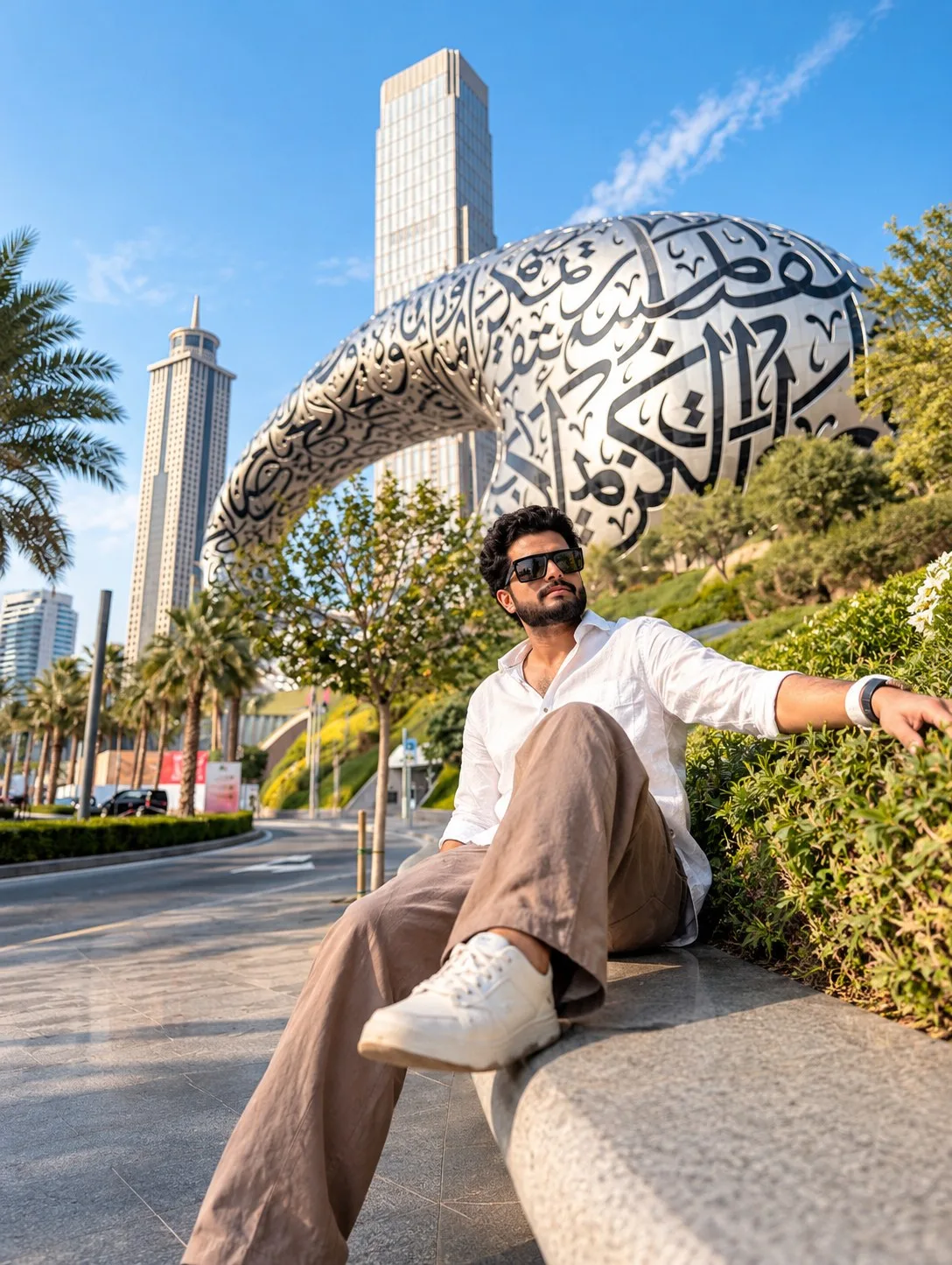
Dubai Museum of the Future Portrait
Use my uploaded photo as the STRICT facial identity reference.
IDENTITY PRESERVATION:
Preserve my exact facial identity, facial structure, eyes, eyebrows, nose, lips, jawline, natural skin tone, ethnicity, age, and all recognisable facial characteristics. The final person must remain unmistakably recognisable as me.
Do not replace, redesign, merge, whiten, excessively beautify, or significantly alter my face. Preserve realistic skin pores, natural facial proportions, beard growth, and authentic facial details.
CONCEPT:
Create an ultra-photorealistic premium Dubai travel-fashion portrait of me sitting outdoors near the Museum of the Future in Dubai during beautiful bright daylight.
The Museum of the Future must appear large, impressive, and clearly recognisable in the background, creating a premium Dubai landmark travel photograph.
LOCATION & BACKGROUND:
Recreate a clean landscaped urban area surrounding Dubai's Museum of the Future.
Include:
- the iconic silver torus-shaped Museum of the Future
- intricate dark Arabic calligraphy-style cut-outs across its metallic exterior
- modern Dubai skyscrapers behind and around it
- landscaped green slopes
- manicured bushes
- palm trees
- clean pedestrian pathways
- smooth stone surfaces
- subtle road in the distance
- contemporary Dubai architecture
- vivid but natural blue sky
- a few soft white clouds
The museum should dominate the upper-right/background portion of the frame without being cropped excessively.
POSE & FRAMING:
Use an improved seated pose that prioritises a clean, clearly visible face.
Place me on the edge of a premium curved stone bench beside landscaped greenery.
Sit at a slight diagonal angle rather than directly facing the camera.
Keep one leg extended naturally downward and slightly toward the camera.
Bend the opposite leg comfortably with the foot positioned closer to the bench.
Rest one arm naturally along the stone bench or greenery-side edge.
Keep the opposite hand relaxed near the thigh.
Turn my upper body slightly toward the camera.
Turn my head approximately 15–20 degrees toward the left side of the frame and look confidently into the distance.
Keep my chin slightly raised.
IMPORTANT:
Do not use an extreme shoe-toward-camera pose. Keep the foreground foot naturally sized so it does not dominate the composition.
Position me slightly closer to the camera so my face remains clearly visible even when the image is displayed as a mobile prompt-library thumbnail.
FACE VISIBILITY:
The face is one of the highest priorities.
Keep it:
- tack sharp
- naturally illuminated
- properly exposed
- completely unobstructed
- free from harsh shadows
- separated clearly from the background
EXPRESSION:
Use a calm, confident, relaxed expression with naturally closed lips.
No exaggerated smile.
HAIRSTYLE:
Give me thick black hair with a premium medium-length textured hairstyle.
Use:
- naturally swept-back front
- subtle waves
- clean sides
- controlled volume
- individually visible hair strands
- realistic sunlight highlights
GROOMING:
Add a neatly shaped short beard and moustache.
Keep individual beard strands naturally visible while strictly preserving my facial identity.
EYEWEAR:
Add premium rectangular black sunglasses with sophisticated dark lenses.
Include subtle reflections of the bright Dubai surroundings without completely hiding facial structure.
CLOTHING:
Dress me in a COMPLETELY DIFFERENT premium travel outfit.
Use a sophisticated SAGE-GREEN textured knitted polo shirt.
SHIRT DETAILS:
- premium fine-knit cotton texture
- short sleeves
- structured soft collar
- partially open button placket
- relaxed but tailored silhouette
- subtle ribbed detailing
- realistic fabric folds
- clean minimalist appearance
- no graphics
- no logos
Pair it with premium OFF-WHITE relaxed tailored trousers.
TROUSERS:
Use:
- straight relaxed silhouette
- lightweight cotton-linen fabric
- subtle front pleats
- premium waistband
- natural fabric drape
- realistic creases
- slightly loose contemporary fit
- no logos
FOOTWEAR:
Add premium beige-and-white minimalist sneakers.
Show realistic:
- leather and suede texture
- clean laces
- stitching
- rubber sole
- subtle natural wear
- accurate proportions
ACCESSORIES:
Add a sophisticated silver stainless-steel wristwatch with a minimalist dark dial.
Add one understated bracelet on the opposite wrist.
Keep accessories minimal and logo-free.
LIGHTING:
Use beautiful warm late-afternoon Dubai daylight.
Create:
- soft directional sunlight on the face
- natural skin highlights
- defined jawline
- realistic hair highlights
- detailed knitted-shirt fibres
- realistic trouser texture
- subtle metallic reflections on the watch
- beautiful highlights across the museum's silver exterior
- natural greenery shadows
- realistic architectural reflections
Maintain natural Indian skin tone without whitening.
CAMERA & COMPOSITION:
Vertical 4:5 aspect ratio.
Use a premium environmental seated portrait.
Keep the subject approximately in the lower-middle/right area while allowing the Museum of the Future to dominate the upper background.
Frame from approximately head to shoes while keeping the face sufficiently large.
Use a slightly low eye-level camera perspective to make both the subject and museum look impressive.
Simulate a professional full-frame camera with approximately a 35mm lens.
Avoid excessive wide-angle distortion.
Use moderate depth of field.
Keep:
face = exceptionally sharp
hair = sharp
clothing = detailed
hands = detailed
shoes = detailed
near greenery = detailed
Museum of the Future = clearly recognisable and reasonably sharp
Allow distant buildings to soften naturally.
PHOTOGRAPHY STYLE:
Premium Dubai travel photography combined with contemporary men's fashion editorial photography.
Use:
- natural Indian skin tone
- realistic skin pores
- facial micro-details
- individual beard hairs
- individual head-hair strands
- anatomically accurate hands
- realistic body proportions
- premium clothing textures
- accurate stone texture
- realistic greenery
- detailed metallic architecture
- natural sky
- balanced dynamic range
- sophisticated warm travel colour grading
The finished result must look like an authentic professional photograph taken in Dubai, not digital artwork.
ULTRA-HIGH-RESOLUTION UPSCALE & ENHANCEMENT:
Generate and finish the portrait in ultra-high-resolution premium display quality suitable for the Mera Photo AI prompt library.
Naturally enhance:
- facial micro-details
- skin pores
- eyebrows
- beard strands
- individual hair strands
- sunglasses edges
- knitted polo fibres
- trouser fabric weave
- hands and fingers
- wristwatch
- bracelet
- sneaker leather and suede
- stone bench texture
- leaves and greenery
- museum metallic panels
- architectural edges
- Arabic calligraphy-style details
- distant skyscraper details
Apply professional photographic sharpening while retaining natural skin softness.
Do not oversharpen or introduce artificial texture.
FINAL RESULT:
A premium, realistic Dubai lifestyle portrait of a stylish Indian man relaxing near the Museum of the Future, wearing a sage-green knitted polo and off-white tailored trousers, with a clean visible face, sophisticated seated pose, premium daylight, and spectacular Dubai architecture behind him.
NEGATIVE INSTRUCTIONS:
No Instagram/Reels interface, usernames, profile photos, Follow button, likes, comments, share icons, carousel indicators, captions, music information, navigation bars, phone status bar, watermark, random text, or unwanted logos.
Avoid altered identity, tiny face, blurry face, face hidden by sunglasses or shadows, plastic skin, excessive smoothing, skin whitening, fake beard, artificial hair, malformed hands, extra fingers, missing fingers, fused fingers, duplicated limbs, distorted legs, giant foreground shoes, unrealistic body proportions, warped museum architecture, malformed calligraphy patterns, duplicated buildings, fake greenery, oversaturated blue sky, excessive HDR, sharpening halos, and artificial background blur.
IDENTITY PRESERVATION:
Preserve my exact facial identity, facial structure, eyes, eyebrows, nose, lips, jawline, natural skin tone, ethnicity, age, and all recognisable facial characteristics. The final person must remain unmistakably recognisable as me.
Do not replace, redesign, merge, whiten, excessively beautify, or significantly alter my face. Preserve realistic skin pores, natural facial proportions, beard growth, and authentic facial details.
CONCEPT:
Create an ultra-photorealistic premium Dubai travel-fashion portrait of me sitting outdoors near the Museum of the Future in Dubai during beautiful bright daylight.
The Museum of the Future must appear large, impressive, and clearly recognisable in the background, creating a premium Dubai landmark travel photograph.
LOCATION & BACKGROUND:
Recreate a clean landscaped urban area surrounding Dubai's Museum of the Future.
Include:
- the iconic silver torus-shaped Museum of the Future
- intricate dark Arabic calligraphy-style cut-outs across its metallic exterior
- modern Dubai skyscrapers behind and around it
- landscaped green slopes
- manicured bushes
- palm trees
- clean pedestrian pathways
- smooth stone surfaces
- subtle road in the distance
- contemporary Dubai architecture
- vivid but natural blue sky
- a few soft white clouds
The museum should dominate the upper-right/background portion of the frame without being cropped excessively.
POSE & FRAMING:
Use an improved seated pose that prioritises a clean, clearly visible face.
Place me on the edge of a premium curved stone bench beside landscaped greenery.
Sit at a slight diagonal angle rather than directly facing the camera.
Keep one leg extended naturally downward and slightly toward the camera.
Bend the opposite leg comfortably with the foot positioned closer to the bench.
Rest one arm naturally along the stone bench or greenery-side edge.
Keep the opposite hand relaxed near the thigh.
Turn my upper body slightly toward the camera.
Turn my head approximately 15–20 degrees toward the left side of the frame and look confidently into the distance.
Keep my chin slightly raised.
IMPORTANT:
Do not use an extreme shoe-toward-camera pose. Keep the foreground foot naturally sized so it does not dominate the composition.
Position me slightly closer to the camera so my face remains clearly visible even when the image is displayed as a mobile prompt-library thumbnail.
FACE VISIBILITY:
The face is one of the highest priorities.
Keep it:
- tack sharp
- naturally illuminated
- properly exposed
- completely unobstructed
- free from harsh shadows
- separated clearly from the background
EXPRESSION:
Use a calm, confident, relaxed expression with naturally closed lips.
No exaggerated smile.
HAIRSTYLE:
Give me thick black hair with a premium medium-length textured hairstyle.
Use:
- naturally swept-back front
- subtle waves
- clean sides
- controlled volume
- individually visible hair strands
- realistic sunlight highlights
GROOMING:
Add a neatly shaped short beard and moustache.
Keep individual beard strands naturally visible while strictly preserving my facial identity.
EYEWEAR:
Add premium rectangular black sunglasses with sophisticated dark lenses.
Include subtle reflections of the bright Dubai surroundings without completely hiding facial structure.
CLOTHING:
Dress me in a COMPLETELY DIFFERENT premium travel outfit.
Use a sophisticated SAGE-GREEN textured knitted polo shirt.
SHIRT DETAILS:
- premium fine-knit cotton texture
- short sleeves
- structured soft collar
- partially open button placket
- relaxed but tailored silhouette
- subtle ribbed detailing
- realistic fabric folds
- clean minimalist appearance
- no graphics
- no logos
Pair it with premium OFF-WHITE relaxed tailored trousers.
TROUSERS:
Use:
- straight relaxed silhouette
- lightweight cotton-linen fabric
- subtle front pleats
- premium waistband
- natural fabric drape
- realistic creases
- slightly loose contemporary fit
- no logos
FOOTWEAR:
Add premium beige-and-white minimalist sneakers.
Show realistic:
- leather and suede texture
- clean laces
- stitching
- rubber sole
- subtle natural wear
- accurate proportions
ACCESSORIES:
Add a sophisticated silver stainless-steel wristwatch with a minimalist dark dial.
Add one understated bracelet on the opposite wrist.
Keep accessories minimal and logo-free.
LIGHTING:
Use beautiful warm late-afternoon Dubai daylight.
Create:
- soft directional sunlight on the face
- natural skin highlights
- defined jawline
- realistic hair highlights
- detailed knitted-shirt fibres
- realistic trouser texture
- subtle metallic reflections on the watch
- beautiful highlights across the museum's silver exterior
- natural greenery shadows
- realistic architectural reflections
Maintain natural Indian skin tone without whitening.
CAMERA & COMPOSITION:
Vertical 4:5 aspect ratio.
Use a premium environmental seated portrait.
Keep the subject approximately in the lower-middle/right area while allowing the Museum of the Future to dominate the upper background.
Frame from approximately head to shoes while keeping the face sufficiently large.
Use a slightly low eye-level camera perspective to make both the subject and museum look impressive.
Simulate a professional full-frame camera with approximately a 35mm lens.
Avoid excessive wide-angle distortion.
Use moderate depth of field.
Keep:
face = exceptionally sharp
hair = sharp
clothing = detailed
hands = detailed
shoes = detailed
near greenery = detailed
Museum of the Future = clearly recognisable and reasonably sharp
Allow distant buildings to soften naturally.
PHOTOGRAPHY STYLE:
Premium Dubai travel photography combined with contemporary men's fashion editorial photography.
Use:
- natural Indian skin tone
- realistic skin pores
- facial micro-details
- individual beard hairs
- individual head-hair strands
- anatomically accurate hands
- realistic body proportions
- premium clothing textures
- accurate stone texture
- realistic greenery
- detailed metallic architecture
- natural sky
- balanced dynamic range
- sophisticated warm travel colour grading
The finished result must look like an authentic professional photograph taken in Dubai, not digital artwork.
ULTRA-HIGH-RESOLUTION UPSCALE & ENHANCEMENT:
Generate and finish the portrait in ultra-high-resolution premium display quality suitable for the Mera Photo AI prompt library.
Naturally enhance:
- facial micro-details
- skin pores
- eyebrows
- beard strands
- individual hair strands
- sunglasses edges
- knitted polo fibres
- trouser fabric weave
- hands and fingers
- wristwatch
- bracelet
- sneaker leather and suede
- stone bench texture
- leaves and greenery
- museum metallic panels
- architectural edges
- Arabic calligraphy-style details
- distant skyscraper details
Apply professional photographic sharpening while retaining natural skin softness.
Do not oversharpen or introduce artificial texture.
FINAL RESULT:
A premium, realistic Dubai lifestyle portrait of a stylish Indian man relaxing near the Museum of the Future, wearing a sage-green knitted polo and off-white tailored trousers, with a clean visible face, sophisticated seated pose, premium daylight, and spectacular Dubai architecture behind him.
NEGATIVE INSTRUCTIONS:
No Instagram/Reels interface, usernames, profile photos, Follow button, likes, comments, share icons, carousel indicators, captions, music information, navigation bars, phone status bar, watermark, random text, or unwanted logos.
Avoid altered identity, tiny face, blurry face, face hidden by sunglasses or shadows, plastic skin, excessive smoothing, skin whitening, fake beard, artificial hair, malformed hands, extra fingers, missing fingers, fused fingers, duplicated limbs, distorted legs, giant foreground shoes, unrealistic body proportions, warped museum architecture, malformed calligraphy patterns, duplicated buildings, fake greenery, oversaturated blue sky, excessive HDR, sharpening halos, and artificial background blur.