3

Mera Photo AI @meraphotoai
35 views
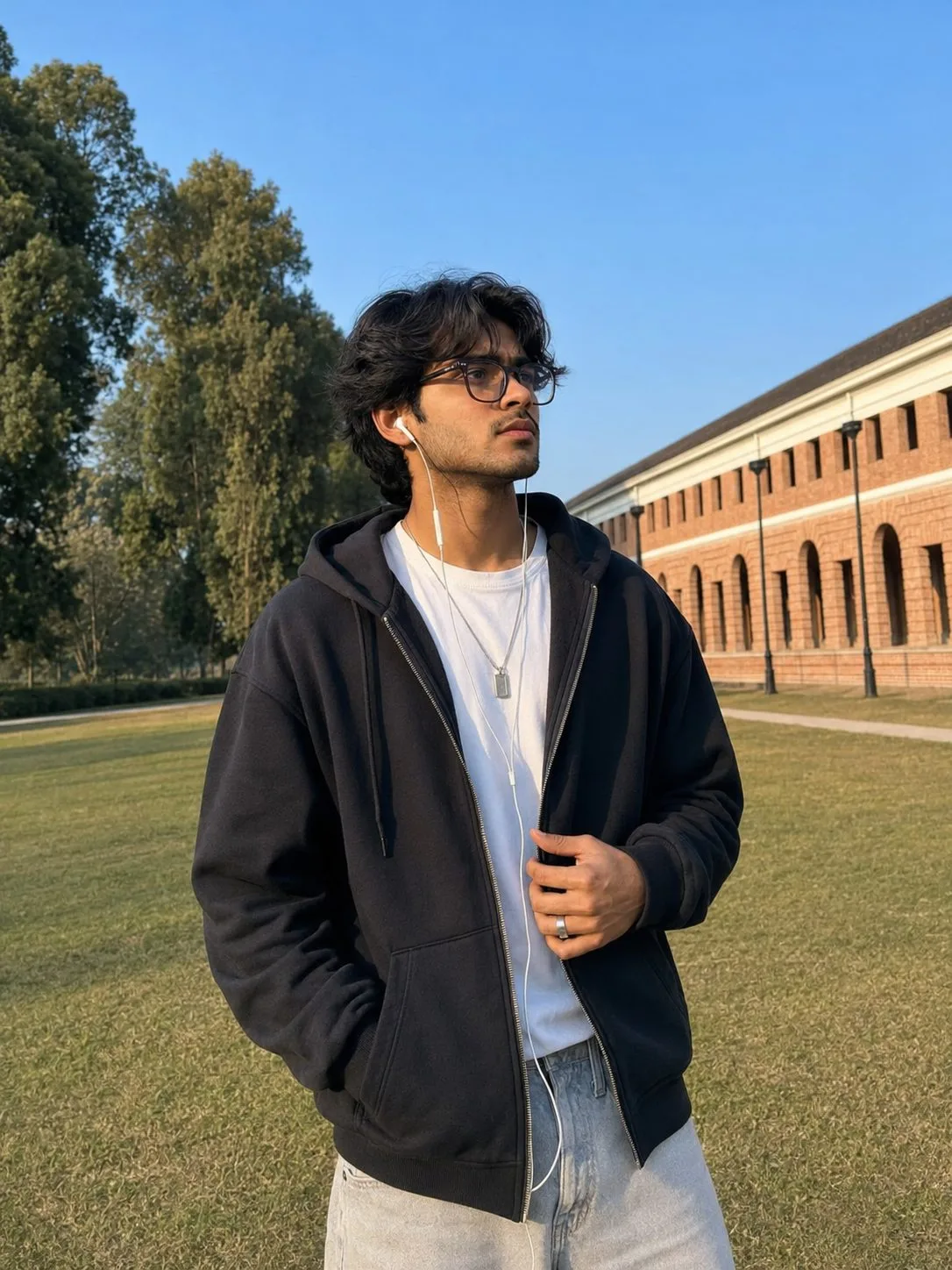
Indian Man Wearing a Black Hoodie at a Heritage Campus
Use the uploaded person’s photograph as the strict identity reference. Preserve their exact real facial identity, natural appearance and current age while recreating the following campus lifestyle portrait.
IDENTITY PRESERVATION:
Accurately retain the person’s real facial structure, eyes, eyebrows, nose, lips, cheeks, jawline, hairstyle, facial hair, natural Indian skin tone, ethnicity, current age and all recognisable facial characteristics.
Do not replace or redesign the face. Do not change the person’s age, ethnicity, complexion or natural body proportions. Avoid skin whitening, facial reshaping, plastic skin, excessive smoothing and artificial glamour effects. The person must remain naturally and immediately recognisable.
ORIGINAL CONCEPT:
Create a premium lifestyle portrait of the person standing on the lawn of an elegant heritage campus in Dehradun.
Preserve the oversized black hoodie, white inner T-shirt, optical glasses, wired earphones, reflective standing pose, broad lawn, red-brick arched building and clear blue sky.
POSE AND EXPRESSION:
Position the person slightly left of centre with the torso angled towards camera-right and the shoulders naturally relaxed.
Place the left hand comfortably inside the hoodie pocket.
Raise the right hand near the lower zipper line and use it to hold the hoodie edge and earphone cable gently. Keep all fingers naturally separated and clearly visible.
Turn the head towards camera-right and look slightly upward into the distance with a calm, introspective expression.
Keep both arms, elbows, wrists, hands and fingers anatomically accurate.
CLOTHING AND ACCESSORIES:
Dress the person in a premium oversized matte-charcoal zip-up hoodie featuring:
- Dropped shoulders
- Clean structured hood
- Ribbed cuffs and hem
- Realistic heavyweight cotton texture
- Natural folds
- No visible branding
Wear the hoodie open over a plain warm-white heavyweight crew-neck T-shirt.
Pair it with light stone-grey relaxed straight-fit jeans.
Add translucent smoke-grey rectangular optical glasses with a slim dark-acetate frame.
Use clean white wired in-ear earphones with one cable descending from each ear and joining naturally near the chest. The wires must remain untangled and anatomically positioned.
Include a minimalist brushed-steel pendant on a thin chain and one matte-silver ring on the right index finger. Do not add earrings or excessive jewellery.
BACKGROUND:
Create a premium Dehradun heritage university campus featuring:
- A long warm red-brick Indo-colonial building
- Repeating tall arches
- Cream cornice bands
- Dark window openings
- Vintage black lamp posts
- Broad well-maintained lawn
- Tall mature trees on the left
- Clear blue sky
- One narrow paved path in the distance
Let the building run diagonally from the centre-right into the background.
Do not include motorcycles, vehicles, crowds, signs, readable building names or distracting objects.
LIGHTING AND PHOTOGRAPHY:
Use warm late-afternoon sunlight entering from the upper-left. Add gentle facial fill so the identity, eyes and natural Indian skin tone remain clearly visible.
Create soft realistic shadows with warm highlights across the hair, hoodie and red-brick façade.
Use a professional 50mm lifestyle portrait-lens appearance with shallow but controlled depth of field.
Keep the face, glasses, earphones and right hand sharp while gently separating the heritage building.
Show realistic skin pores, hair strands, cotton texture, cable details and masonry. Apply a natural warm editorial colour grade without excessive orange tones or skin whitening.
COMPOSITION:
Use a 3:4 portrait aspect ratio with medium-to-three-quarter framing.
Show the person from the complete hair to the upper thighs. Position the person slightly left of centre.
Keep the red-brick arches receding along the right, mature trees on the left and clean blue-sky negative space above the head.
The final result must look like a genuine professional campus photograph—not an illustration, painting, CGI render or obvious AI-generated artwork.
Remove every social-media screenshot element, including reaction icons, counters, buttons and interface overlays. Do not include text, logos, borders, signatures or watermarks.
IDENTITY PRESERVATION:
Accurately retain the person’s real facial structure, eyes, eyebrows, nose, lips, cheeks, jawline, hairstyle, facial hair, natural Indian skin tone, ethnicity, current age and all recognisable facial characteristics.
Do not replace or redesign the face. Do not change the person’s age, ethnicity, complexion or natural body proportions. Avoid skin whitening, facial reshaping, plastic skin, excessive smoothing and artificial glamour effects. The person must remain naturally and immediately recognisable.
ORIGINAL CONCEPT:
Create a premium lifestyle portrait of the person standing on the lawn of an elegant heritage campus in Dehradun.
Preserve the oversized black hoodie, white inner T-shirt, optical glasses, wired earphones, reflective standing pose, broad lawn, red-brick arched building and clear blue sky.
POSE AND EXPRESSION:
Position the person slightly left of centre with the torso angled towards camera-right and the shoulders naturally relaxed.
Place the left hand comfortably inside the hoodie pocket.
Raise the right hand near the lower zipper line and use it to hold the hoodie edge and earphone cable gently. Keep all fingers naturally separated and clearly visible.
Turn the head towards camera-right and look slightly upward into the distance with a calm, introspective expression.
Keep both arms, elbows, wrists, hands and fingers anatomically accurate.
CLOTHING AND ACCESSORIES:
Dress the person in a premium oversized matte-charcoal zip-up hoodie featuring:
- Dropped shoulders
- Clean structured hood
- Ribbed cuffs and hem
- Realistic heavyweight cotton texture
- Natural folds
- No visible branding
Wear the hoodie open over a plain warm-white heavyweight crew-neck T-shirt.
Pair it with light stone-grey relaxed straight-fit jeans.
Add translucent smoke-grey rectangular optical glasses with a slim dark-acetate frame.
Use clean white wired in-ear earphones with one cable descending from each ear and joining naturally near the chest. The wires must remain untangled and anatomically positioned.
Include a minimalist brushed-steel pendant on a thin chain and one matte-silver ring on the right index finger. Do not add earrings or excessive jewellery.
BACKGROUND:
Create a premium Dehradun heritage university campus featuring:
- A long warm red-brick Indo-colonial building
- Repeating tall arches
- Cream cornice bands
- Dark window openings
- Vintage black lamp posts
- Broad well-maintained lawn
- Tall mature trees on the left
- Clear blue sky
- One narrow paved path in the distance
Let the building run diagonally from the centre-right into the background.
Do not include motorcycles, vehicles, crowds, signs, readable building names or distracting objects.
LIGHTING AND PHOTOGRAPHY:
Use warm late-afternoon sunlight entering from the upper-left. Add gentle facial fill so the identity, eyes and natural Indian skin tone remain clearly visible.
Create soft realistic shadows with warm highlights across the hair, hoodie and red-brick façade.
Use a professional 50mm lifestyle portrait-lens appearance with shallow but controlled depth of field.
Keep the face, glasses, earphones and right hand sharp while gently separating the heritage building.
Show realistic skin pores, hair strands, cotton texture, cable details and masonry. Apply a natural warm editorial colour grade without excessive orange tones or skin whitening.
COMPOSITION:
Use a 3:4 portrait aspect ratio with medium-to-three-quarter framing.
Show the person from the complete hair to the upper thighs. Position the person slightly left of centre.
Keep the red-brick arches receding along the right, mature trees on the left and clean blue-sky negative space above the head.
The final result must look like a genuine professional campus photograph—not an illustration, painting, CGI render or obvious AI-generated artwork.
Remove every social-media screenshot element, including reaction icons, counters, buttons and interface overlays. Do not include text, logos, borders, signatures or watermarks.